
Introduction:
Your fully Private Chatting You and I trust WhatsApp with almost everything—personal chats, bank OTPs, photos, even confidential work details. It feels secure because of end-to-end encryption. But here’s the truth: encryption alone doesn’t protect you if your settings are weak.
Right now, data leaks and WhatsApp scams are increasing rapidly. Hackers don’t always break encryption—they exploit user mistakes. I’ve personally seen users lose privacy just because one setting was left on by default.
The good news? You don’t need any technical skills to fix this. Just a few smart changes can dramatically reduce your risk. These 3 powerful WhatsApp settings act like a shield for your personal data.
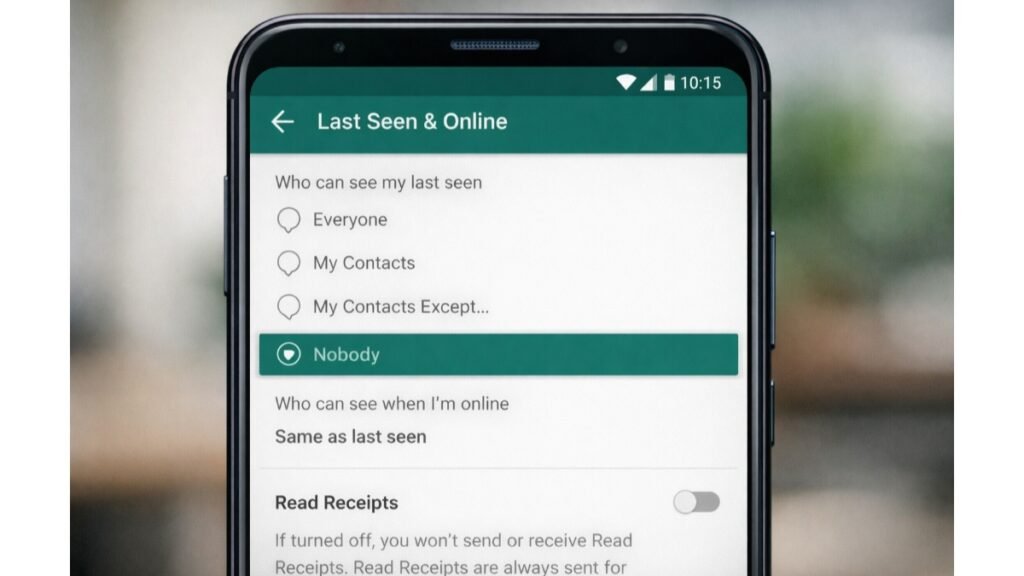
1. Hide Your Whatsapp Activity: Last Seen And Read Receipts
Why this matters
Every time you open a message, WhatsApp tells the sender you’ve read it. Your “Last Seen” also shows when you were last active.
This may seem harmless, but it creates a pattern of your daily behavior. Scammers and unknown contacts can track when you’re online, making it easier to target you at the right moment.
What to do
- Open Settings → Privacy
- Tap Last Seen & Online
- Set Last Seen to Nobody or My Contacts
- Change Online visibility to Same as Last Seen
- Turn OFF Read Receipts
What changes
- No one can track your activity timing
- You stay invisible while reading messages
- Less pressure to reply instantly
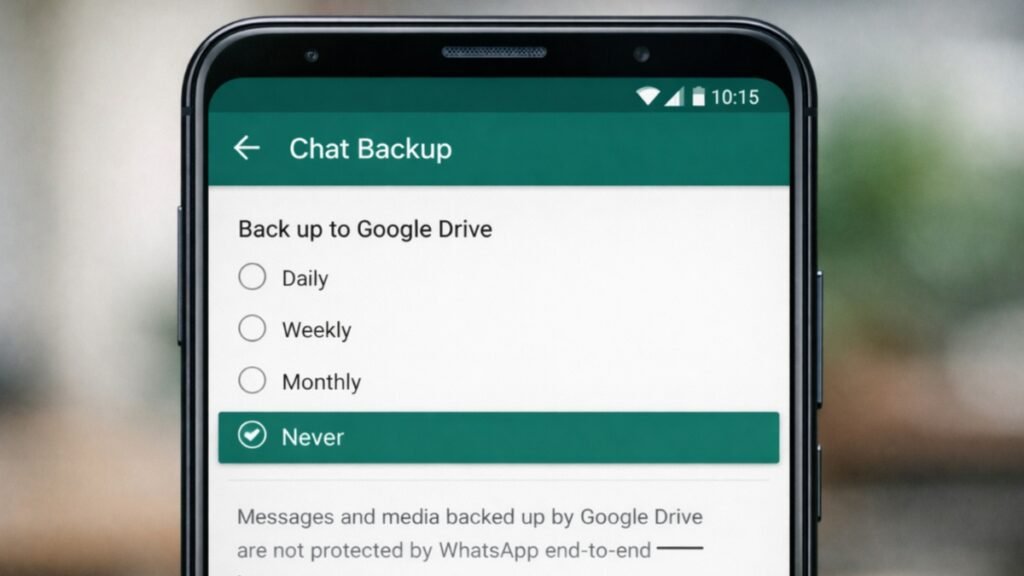
2. Turn Off Cloud Backup (Your Biggest Privacy Risk)
Why this matters
WhatsApp messages are encrypted—but backups are a different story. When your chats are stored on Google Drive or iCloud, they may not have the same level of protection.
If someone gains access to your cloud account, they can potentially read your entire chat history. This is one of the most ignored privacy threats users often miss. How to Use TikTok for Small Business Growth
What to do
- Go to Your Wp Settings → Chats → Chat Backup
- Tap Back up to Google Drive
- Select Never
For iPhone users:
- Open iPhone settings
- Disable WhatsApp backup in iCloud
What changes
- Your chats stay only on your device
- No external storage means fewer leak points
- Better control over your data
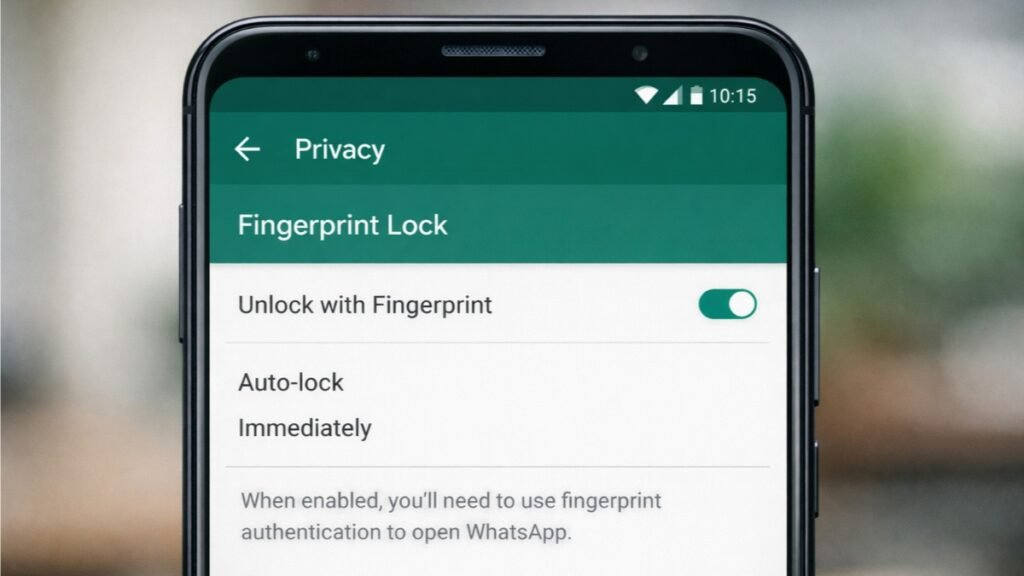
3. Lock Your Chats with Fingerprint or Face ID
Why this matters
Most people think locking their phone is enough. It’s not. If someone unlocks your phone—even briefly—they can open WhatsApp and read everything.
This is especially risky if you share your phone with friends or family.
What to do
- Go to Settings → Privacy → App Lock
- Turn ON Unlock with Fingerprint or Face ID
- Set auto-lock timing to Immediately
What changes
- Your chats stay protected even if your phone is unlocked
- Only you can access sensitive conversations
- Extra security layer against misuse
LuxuryGole Tip (Pro-Level Privacy Upgrade)
Turn on Two-Step Verification inside WhatsApp:
- Go to Settings → Account → Two-step verification
- Set a secure 6-digit PIN
- Add an email for recovery
This feature protects your account from SIM swap attacks. Even if someone gets your number, they can’t access your WhatsApp without your PIN.
Privacy Note: Your Habits Matter Too
Even the best settings won’t protect you if your behavior is risky. Always follow these basic rules: 5 Best Free AI Image Generator Tools in 2026
- Never share OTP or verification codes
- Avoid clicking unknown or suspicious links
- Don’t download files from unknown contacts
- Keep your app updated regularly
Remember, most WhatsApp hacks happen due to human error—not technical flaws.
Bonus Setting You Should Check (Often Ignored)
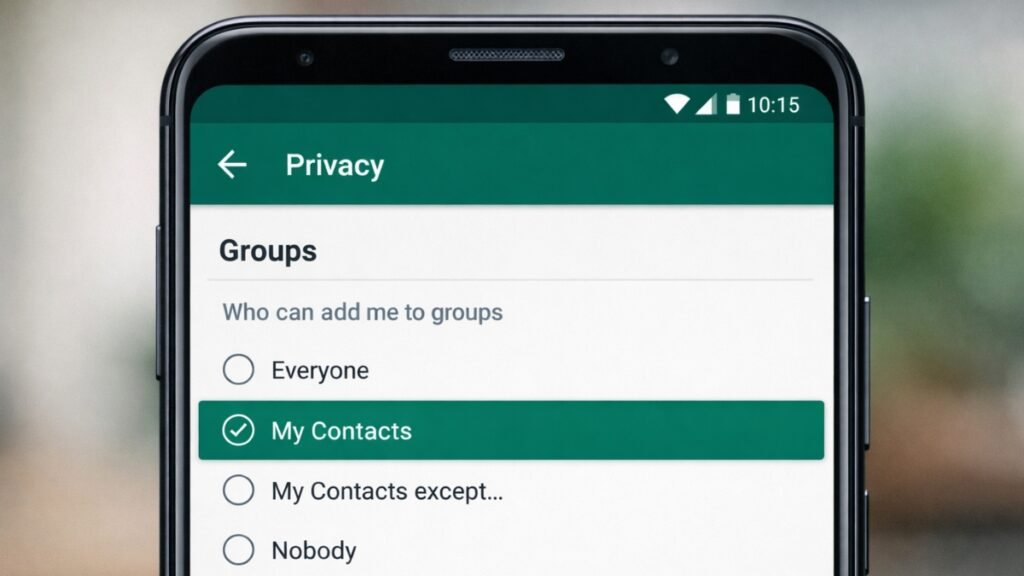
Control Who Can Add You to Groups
Random group additions can expose your number and personal data.
What to do
- Go to Settings → Privacy → Groups
- Select My Contacts Except… or My Contacts
Why it matters
- Prevents spam groups
- Keeps your number safe from strangers
- Reduces phishing attempts
Conclusion: Take Control Before It’s Too Late
Your privacy on WhatsApp is not automatic it depends on your settings. The default options are designed for convenience, not maximum security. By turning off activity tracking, disabling cloud backups, and locking your chats, you create a strong defense against data leaks. These changes take less than 5 minutes but can save you from serious privacy risks. How to Start Investing at 25 with ₹30,000 Salary in India for Long-Term Growth 2026
CTA: Now that you’ve secured these settings, go check WhatsApp’s Privacy Checkup feature it reveals hidden risks most users never notice.

Wasim Akram is the Founder of LuxuryGole and a dedicated Tech Expert with over 10 years of experience in the digital ecosystem. Specializing in smartphone optimization, hidden software hacks, and digital security, Wasim focuses on providing premium, actionable insights to help users master their technology. His decade-long journey in the tech space ensures that every guide on LuxuryGole is backed by deep research and practical expertise. Connect with him on LinkedIn and Facebook for daily tech updates